Collaboration Tracker shows exactly who contributed what, so you can assess fairly, save time, and support better teamwork.
Try It Free to See How It WorksScrolling through version history to guess who wrote what eats hours and still leaves you unsure
One student carries the draft, another barely contributes — and you only discover it after grades are due
You can see the final doc, but not quality, depth, or originality per contributor without a long manual read
When students dispute fairness, you lack a clear breakdown to show who contributed what
Up and running in minutes — no technical skills needed.
Install the extension
One click from the Chrome Web Store. No account needed.
Open any Google Doc
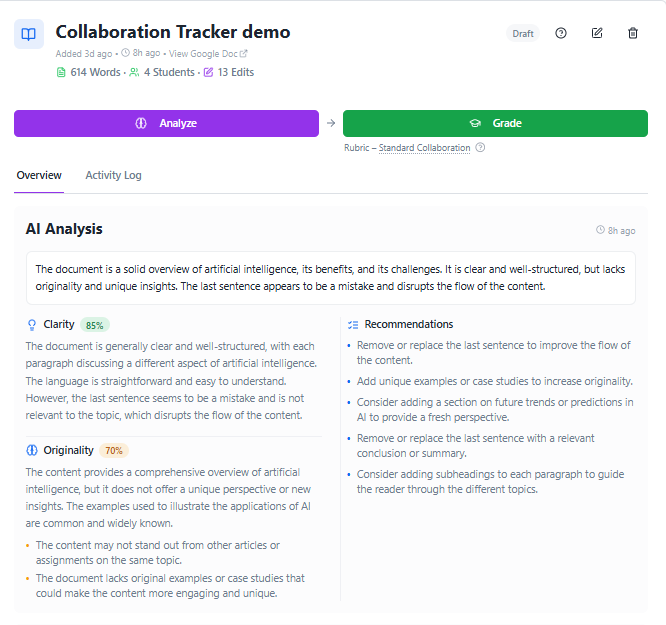
Our AI analyzes contributions for quality, depth, and originality.
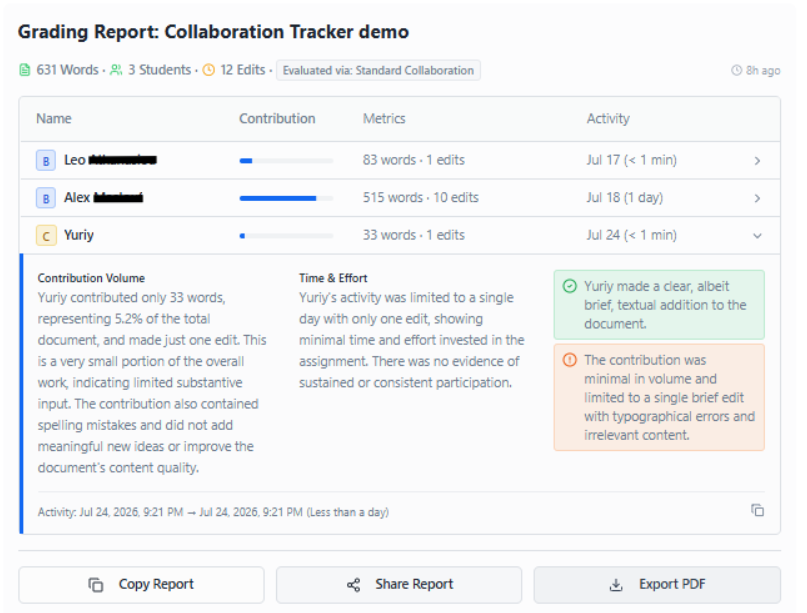
Get your grading report
Clear per-student breakdown, ready to export or share.
Choose the plan that fits your teaching workflow.
Perfect for testing the waters
For individual instructors
For schools and teams
"Before using Collaboration Tracker, I relied on Google Docs revision history, student reflections, and group evaluation forms to understand individual contributions. With many students, this was time-consuming and sometimes led to disagreements about who did what. What I liked most about Collaboration Tracker was the clear, concise data. I could quickly see each student’s word count, time spent working, and overall contribution. The AI-generated grading report was accurate, easy to understand, and user-friendly. I would use this tool to make grading collaborative work more efficient and fair. "
Hillary R., High School Educator
" I have been testing the Collaboration Tracker on several Google Docs in my courses and I am impressed. The grading view that shows student names, collaboration effort, time spent in the document, and number of words/edits is extremely useful. This is exactly the kind of insight I have been missing when assessing group work. I can definitely see myself using this tool regularly with my students. "
Bethany M., College Professor
"Before using Collaboration Tracker, I was just relying on Google Docs or Slides version history to try to figure out each student’s individual contribution to group projects. It was time-consuming and not very accurate. What I loved most about Collaboration Tracker is how clearly it shows each student’s time spent on the document. The AI-generated grading report was very accurate and gave me exactly what I needed. It was so complete that nothing felt missing. I now use the output to help determine students’ grades for collaborative work. It’s made the process much fairer and more transparent."
Sandra A., English Language Arts Educator